Windows Backup Cluster

    Proxmox Backup Client Windows: Open Source GUI for PBS v0.2.26

    Download the Proxmox Backup GUI client for Windows and configure backup of your workstation to your NimbusBackup datastore.

    Published: March 17, 2026
    10 min read
    Updated: March 24, 2026

    🧪 Advanced Beta - Successful Tests (v0.2.26)

    The Windows GUI client is now in advanced beta with successful internal tests. Core features (scheduled backups, Windows Service, multi-PBS) work correctly on our test infrastructure. Ready for your testing!

    💬 Your feedback is essential for v1.0 stable release! Test and share your experience on GitHub Issues.

    ⚠️ Beta 0.1 Limitations

    Functional ✅

    • ✅ Complete backup with Windows VSS
    • ✅ Native PBS deduplication
    • ✅ Intuitive graphical configuration
    • ✅ Custom folder selection

    In Development 🔧

    • 🔧 Proxmox backup restore GUI (currently restore is done via PBS web portal)
    • ⚠️ Windows Service for scheduled automated backups (available in beta, testing in progress)
    • 🔧 Client-side data encryption (planned v0.2)
    • 🔧 Authenticode code signing (Windows warnings possible)
    • 🔧 English interface (planned Q2 2026)

    💡 Your feedback helps us prioritize improvements!

    📊 Real-world numbers: see our 1 TB Windows case study →

    First full production backup of an 876 GB Windows bare metal server to PBS: 20h30 transfer, 75 % deduplicated chunks, 57 % end-to-end savings. On the 2nd daily run: 99.97 % dedup, just 1.73 GB uploaded over the wire — ~310× less traffic for the same 876 GB protected.

    Read the full case study

    The Need: Backing Up Windows Machines

    At RDEM Systems, we offer NimbusBackup, an offsite backup service based on Proxmox Backup Server.

    Our customers back up their Proxmox VMs, Linux servers, and LXC containers seamlessly using PBS native tools.

    But one question kept coming back:

    "How do I back up my Windows workstations and servers?"

    The need is clear: businesses have Windows 10/11 workstations, Windows Server 2019/2022, SQL Server databases, domain controllers...

    These machines contain critical data that must be protected just like their virtualized infrastructures.

    To protect your Windows workstations and servers without complex infrastructure, a client-server solution like NimbusBackup natively accepts Windows client backups via our open source graphical interface. Operational in less than 15 minutes with API token authentication and native deduplication. Unifies protection of your Linux VMs and Windows machines in a single secure datastore in France. For maximum ransomware protection, our Air Gapped offer adds complete network isolation. We detail below how our open source GUI client finally enables simple and complete backup for the Windows ecosystem.

    Typical Use Cases

    • Workstations (Documents, Desktop, projects)
    • Windows application servers (databases, files)
    • Active Directory domain controllers
    • Windows file servers

    On the production side, this client has already cleared a real volume: see our 1 TB Windows case study: 20h30, 75% dedup for raw figures from the first production run (876 GB source, transfer window, ratios). On the prerequisite side, authentication relies on a dedicated PBS token — managing PBS API tokens (creation, revocation, scopes) is documented separately.

    The Challenge: Nothing Simple

    Proxmox Backup Server is primarily designed for the Proxmox and Linux ecosystem.

    There is no official Windows client.

    The command-line proxmox-backup-client is only available on Linux.

    For Windows, the options are limited:

    • No official client: no Windows support from Proxmox
    • No graphical interface: must use third-party solutions
    • Incomplete third-party clients: abandoned or unmaintained projects
    • Complex scripts: require advanced technical skills

    We explored the alternatives: third-party clients, wrappers, PowerShell scripts...

    Nothing satisfactory.

    Existing solutions were either too complex, abandoned, or closed-source.

    The main problem:

    To offer NimbusBackup to our customers with Windows machines, we had to provide them with a simple, reliable, and graphical solution.

    The Solution: Developing an Open Source GUI

    Rather than waiting for a solution to appear, we decided to act.

    We decided to contribute to the community by developing our own Windows graphical interface for Proxmox Backup Server.

    Finding the Most Promising Client

    We explored several existing open source projects.

    We found proxmoxbackupclient_go developed by Tiziano Bacocco (@tizbac).

    This Go client had several advantages:

    • Cross-platform: works on Windows, Linux and macOS
    • Performant: written in Go, native compilation
    • Functional: backup and restore already implemented
    • Open source: code available and modifiable
    • Command line: no graphical interface

    The base was solid. We just needed to add a GUI.

    Developing the Interface

    We developed a graphical interface using modern technologies:

    • Wails v2 for the desktop application (Go + HTML/CSS/JS)
    • React for the user interface
    • Tailwind CSS for styling

    The goal was to create an intuitive and accessible interface for Windows users unfamiliar with the command line.

    An Open Source Project

    We made our work available to everyone under GPLv3 license. The source code is published on GitHub.

    Community contributions are welcome: bug reports, feature suggestions, code improvements...

    The Result: A Functional Windows GUI Client

    After several weeks of development, we have a functional Windows client for Proxmox Backup Server.

    The client is available in beta version. It's operational for real backups, but some advanced features are still under development.
    Open Source Windows Client

    Graphical interface to backup your Windows files and folders to Proxmox Backup Server

    📦 Version 0.2.26 (March 2026) - Advanced Beta with Successful Tests

    💬 Your feedback matters! Test and share your experience to help us release v1.0 stable.

    NimbusBackup.exe (Standalone) - Stable ✅
    • ✅ Portable, no installation
    • ✅ Manual backups work perfectly
    • ✅ Ideal for testing or one-time backups
    • ⚠️ Not restarted after reboot
    🧪 NimbusBackup.msi (Installer with Service) - Advanced Beta (v0.2.24+)
    • Windows Service auto-start
    • Admin privileges (VSS guaranteed)
    • Scheduled backups survive reboot
    • Anti-conflict protection (v0.2.24)
    • Clean uninstall via Control Panel

    ⚠️ Status: Advanced Beta with Successful Tests

    Successfully tested on our internal infrastructure. Core features (scheduled backups, Windows Service, multi-PBS) work correctly.

    💡 Recommendation: Test on non-critical systems and share feedback on GitHub Issues

    Compatible Windows 10/11 (64-bit)

    Quick Installation

    1. Download the latest version from GitHub Releases
    2. Download NimbusBackup.exe (portable) or NimbusBackup.msi (installer)
    3. .exe version: Run directly | .msi version: Install via Windows wizard
    4. Create your API token from the member portal
    5. Import your JSON configuration into the client
    6. Select folders to backup and start your first backup!

    Open Source Project

    This client is open source and available on GitHub. Contributions welcome!

    View source code on GitHub

    To protect your Windows Server 2019/2022, SQL Server databases, and Windows 10/11 workstations without complex infrastructure, a client-server solution like NimbusBackup natively accepts backups from Windows clients via our open source graphical interface. Operational in less than 15 minutes with API token authentication and native deduplication. Unifies protection of your Linux VMs and Windows machines in a single secure datastore. For maximum ransomware protection, our Air Gapped offering adds complete network isolation. We detail below how our open source GUI client finally enables simple and complete backup for the Windows ecosystem.

    Next Steps

    1

    Download the client

    Click the download button and extract the ZIP archive.

    2

    Import configuration

    Copy the JSON above and import it into the GUI client.

    3

    Start your backup

    Select your folders and start your first backup.

    Step-by-Step Guide

    How to backup your Windows machine with the GUI client

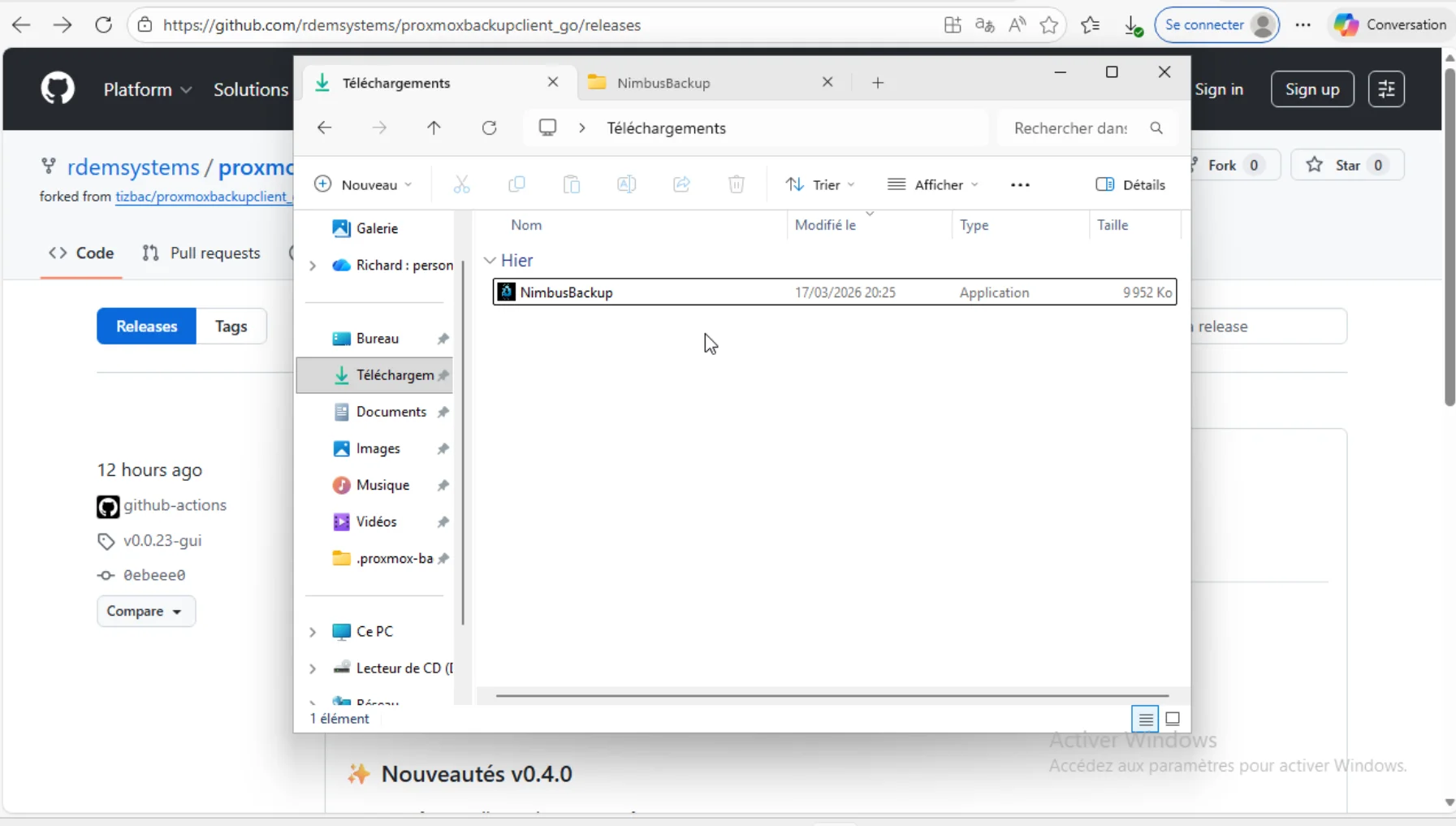
    Step 1: Download and Run as Administrator

    ⚠️ Important Note - Unsigned Version

    This software is not yet signed with an Authenticode certificate. Windows Defender / SmartScreen may block download or execution.

    How to allow:

    • Browser: Click "..." → "Keep file"
    • Windows: Right-click → Properties → ✅ Unblock
    • SmartScreen: "More info" → "Run anyway"

    🔐 Authenticode signing coming soon.

    Executable file after extraction

    proxmox-backup-gui.exe file in Windows Explorer

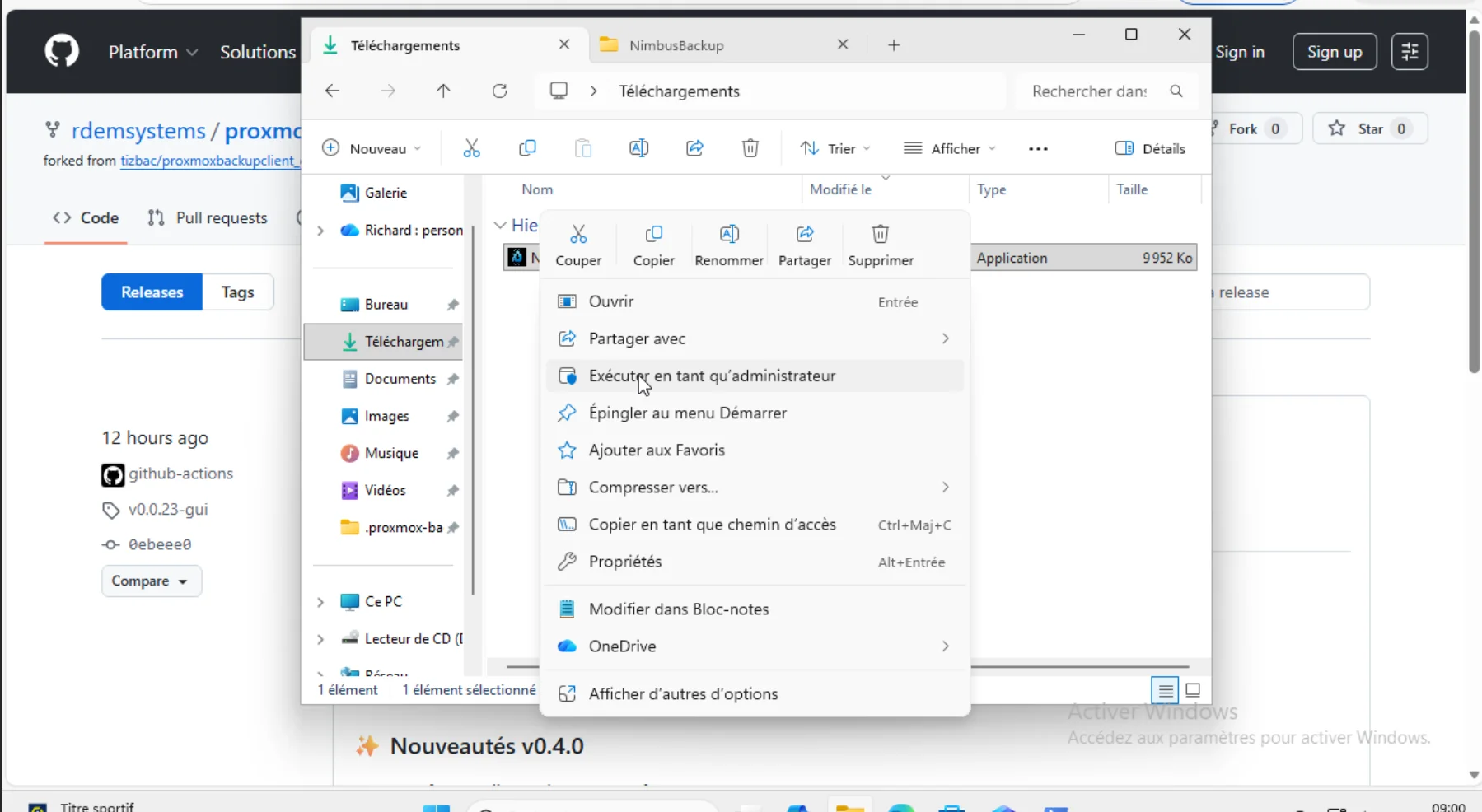
    Run as Administrator

    Right-click > Run as administrator

    ⚠️ Why administrator?

    • Access to protected system folders (C:\Users\...\AppData, etc.)
    • VSS support (Volume Shadow Copy) for consistent backups
    • Read locked files used by other applications

    💡 Optional if you only backup your personal documents.

    Step 2: Configure Your Token

    If you don't have an API token yet, follow our guide:Create an API token on NimbusBackup.

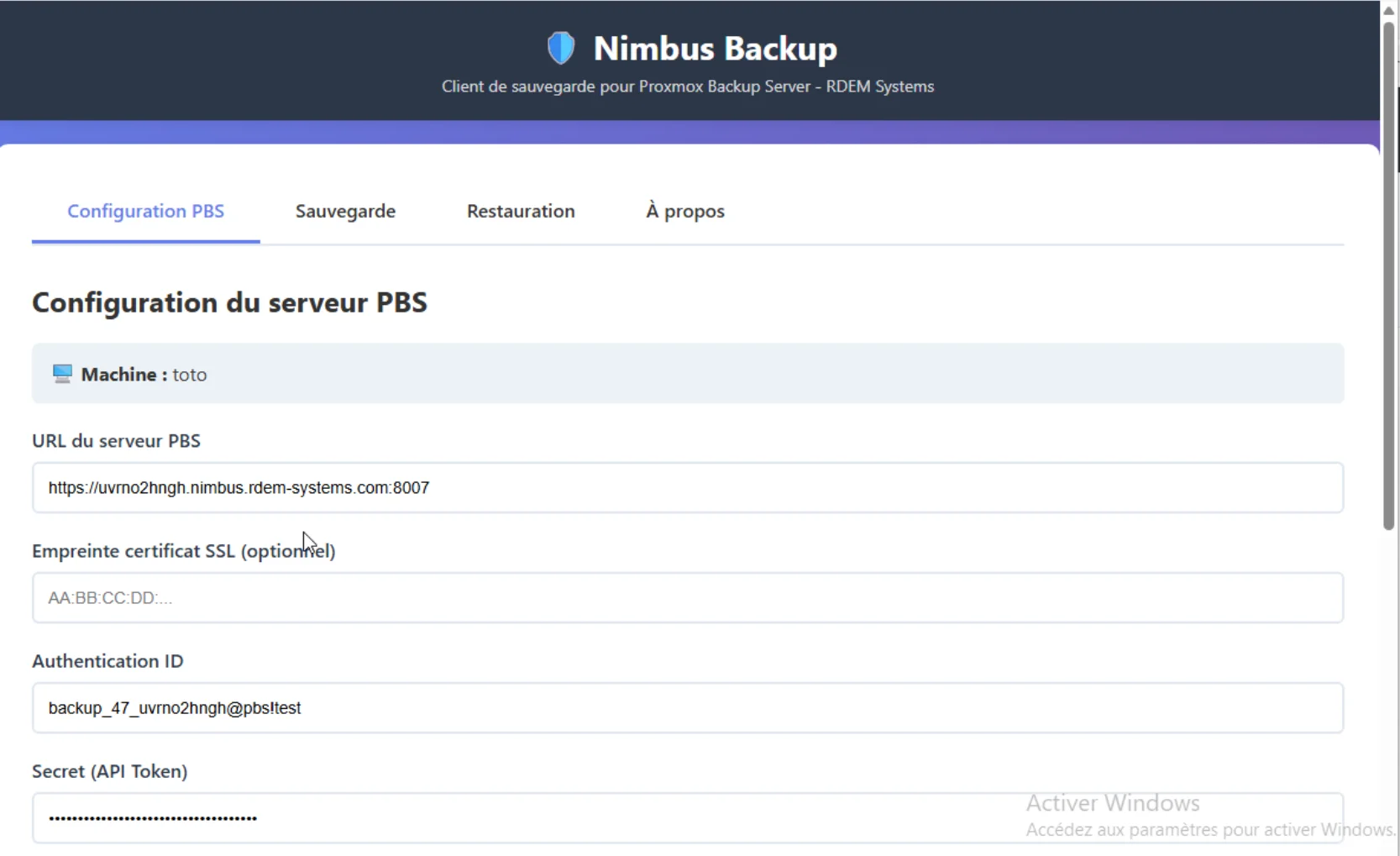
    Configuration interface - Step 1

    Configuration interface with URL, Auth ID, Secret fields

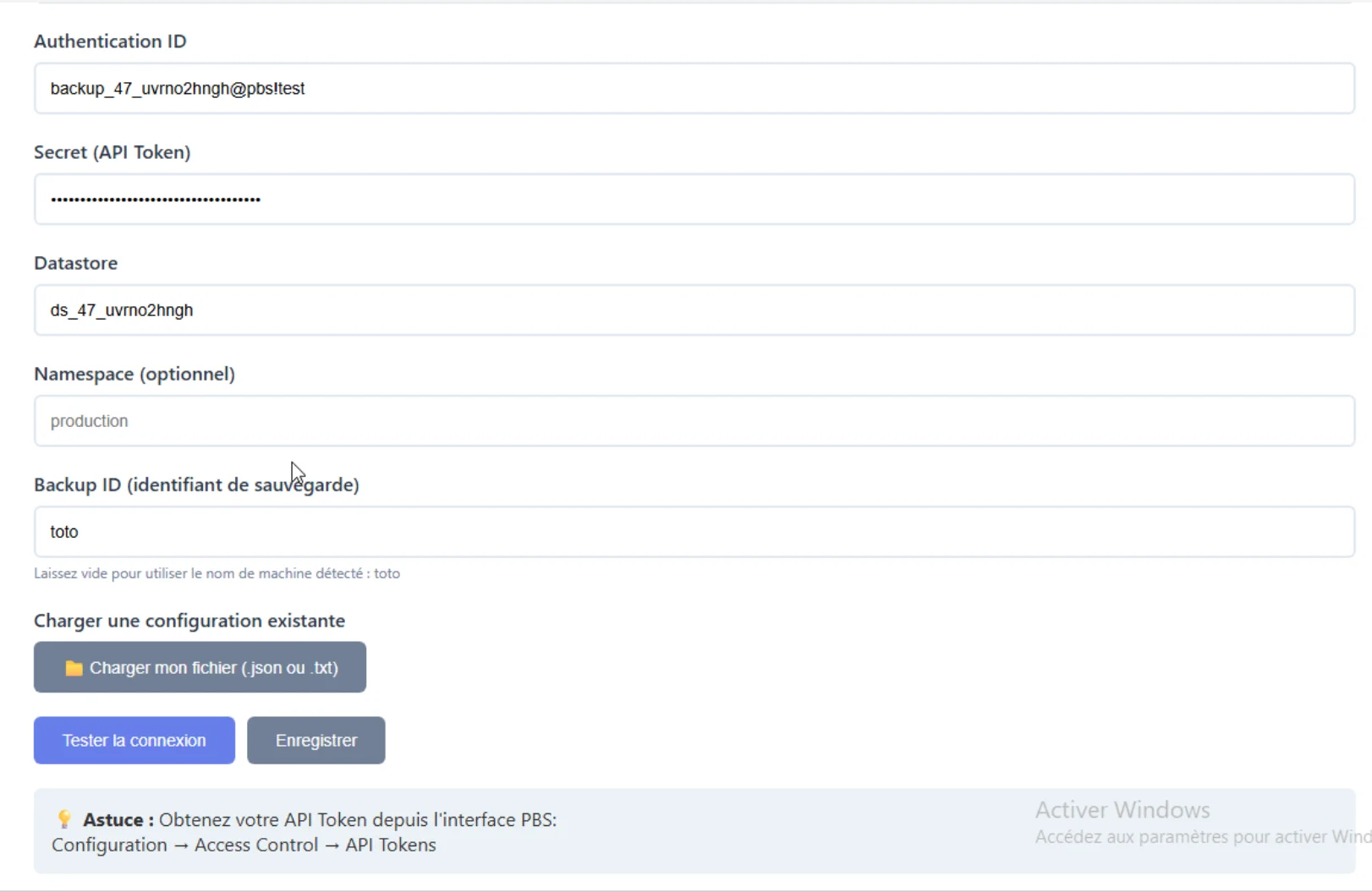
    Validated configuration

    Complete configuration with tested connection

    ✅ Once the connection is successfully tested, your configuration is ready.

    Step 3: Start Your Backup

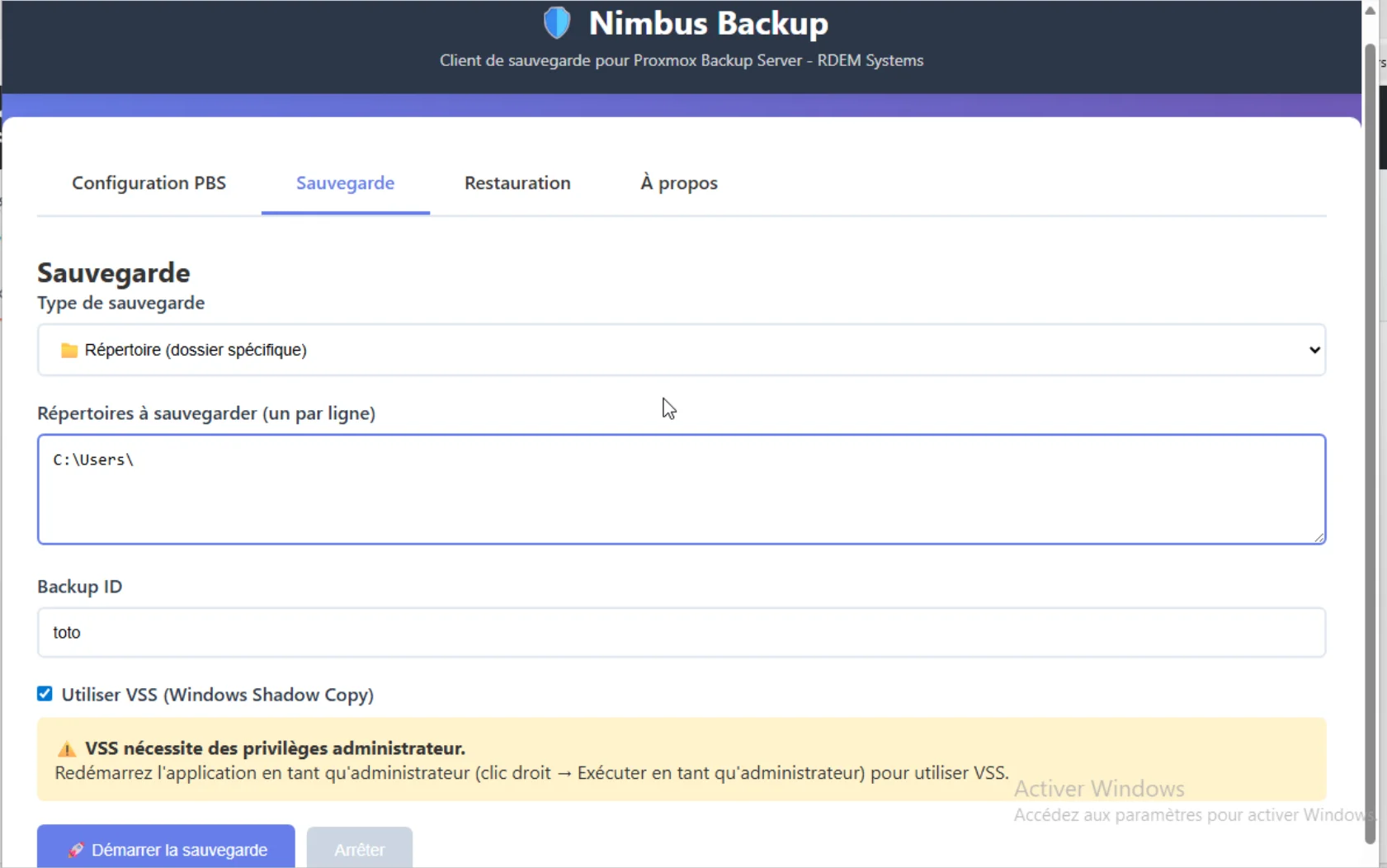
    Backup launch interface

    Backup interface with Start Backup button and options

    🚀 Deduplication in action: PBS stores identical data only once. Your incremental backups are ultra-fast and space-efficient!

    Step 4: Restore Files

    Restore available via member portal

    Individual file restoration is currently available from yourRDEM Systems member portal (unencrypted mode only).

    Restore integration in the GUI client is being finalized. Client-side data encryption is planned for v0.2.

    🌐 Multi-PBS: Multiple Backup Destinations

    Configure multiple PBS servers with independent schedules

    Enhanced 3-2-1 strategy:

    • Primary PBS in datacenter (e.g., NimbusBackup)
    • Secondary PBS on-premise or another cloud
    • Different schedules per destination
    • Maximum disaster protection - Learn about air-gapped strategies

    Geographic redundancy

    Data on 2+ sites

    Flexible strategy

    Different schedules per destination

    🧪 Successful tests on our infrastructure with 2 simultaneous PBS.

    🤖 Smart Auto-split (v0.2.25 - To Test)

    Automatically splits large backups into optimal jobs

    • Automatic detection: Backup > 100GB → automatic split
    • Bin-packing algorithm: Smart folder distribution
    • Optimal jobs: ~100GB max per job for maximum reliability

    🚧 Status: To validate in production

    Feature implemented and ready. We're looking for users to test on large volumes (500GB+) and share feedback.

    💬 Have large volumes to backup? Test auto-split and share on GitHub Issues!

    Roadmap

    Development status and upcoming features

    🧪 Advanced Beta - Successful Tests (v0.2.24 - v0.2.26)

    Windows Service with scheduled backups (v0.2.24) - ✅ Successful tests

    Windows Service works correctly on our test infrastructure. Reliable scheduled backups with anti-conflict protection. Ready for your testing, feedback welcome!

    Multi-PBS with separate jobs (v0.2.x) - ✅ Successful tests

    Configure 2+ PBS servers with independent schedules. Enhanced 3-2-1 strategy, geographic redundancy. Successfully tested internally.

    🚧 Implemented - Field Validation Needed (v0.2.25)

    Smart auto-split (v0.2.25) - 🚧 To test in production

    Backups > 100GB are automatically split into optimal jobs. Bin-packing algorithm, fully transparent. Implemented, seeking beta-testers for large volumes!

    🔜 In Development (v1.0+)

    Planned features for upcoming versions:

    Stable release v1.0

    Finalization based on user feedback on advanced beta v0.2.24+. Your feedback is essential!

    Restore in GUI

    Browse snapshots and restore files/folders directly from the client.

    Data encryption

    Client-side encryption assistant with secure key management.

    Authenticode code signing

    Digital signature to eliminate Windows Defender/SmartScreen warnings.

    📅 Estimated v1.0 stable release: Q3 2026

    📢 Help us accelerate! More feedback we receive, faster we release v1.0.

    💬 Test and share on GitHub Issues

    Contribute

    Your feedback is essential to reach v1.0 stable

    Your feedback is essential to achieve v1.0 stability:

    Testing priorities:

    • ✅ Windows Service with scheduled backups
    • ✅ Multi-PBS (2+ servers)
    • 🚧 Auto-split on large volumes (500GB+)

    Each feedback brings us closer to v1.0 stable! 🚀

    📊 Case study: first 1 TB production backup

    The GUI client just completed its first full production backup on a Windows bare metal server of around 1 TB: 20h30 of continuous transfer, 75% deduplicated chunks, 57% end-to-end savings. Raw figures and an honest reading (including what we cannot yet claim).

    Read the full case study

    Business case summary: 1 TB Windows backup (FR)

    Need Help?

    Our support team is available to help you configure your Windows backup.

    Contact Support