
Backup is the last line of defense for your infrastructure. Yet many Proxmox VE administrators rely on local snapshots or fragile homemade scripts. The OVH SBG2 datacenter fire in March 2021 was a brutal reminder that a backup located in the same datacenter as production is not a backup. This step-by-step guide walks you from local backup with Proxmox Backup Server (PBS) to geographic offsite, through replication and verification best practices. Goal: a 3-2-1 compliant strategy in under one hour.
Prerequisites
Before you begin, make sure you have the following:
- Proxmox VE 7.x or 8.x up to date (examples in this guide use PVE 8.2+)
- Proxmox Backup Server 3.x installed on a dedicated machine or a separate VM (never host PBS on the same node as production)
- A dedicated storage volume for the PBS datastore (ZFS recommended for data integrity)
- Network bandwidth: 1 Gbps minimum between PVE and local PBS, stable internet connection for offsite
- Administrator access to the Proxmox VE and PBS web interfaces
Tip: If you don't have PBS yet, you can download the ISO from the official Proxmox site. Installation takes less than 15 minutes on a dedicated server or in a VM.
Step 1: Local backup with PBS
The first step is to configure a local Proxmox Backup Server to protect your VMs and LXC containers. PBS offers block-level deduplication (variable-length chunking) that significantly reduces the storage space needed.
1.1 Create a datastore on PBS
Log in to the PBS web interface (https://your-pbs:8007) and create a datastore:
# Create the ZFS mount point (recommended)
zfs create -o mountpoint=/mnt/datastore/backups rpool/backups

# Create the datastore via CLI
proxmox-backup-manager datastore create local-backups /mnt/datastore/backups

# Verify creation
proxmox-backup-manager datastore list
You can also create the datastore from the web interface: Datastore > Add Datastore, specifying the path to the storage volume.
1.2 Configure retention
PBS allows you to define granular retention policies. Here is a typical configuration for production use:
| Parameter | Recommended value | Description |
|---|---|---|
keep-last | 3 | The last 3 backups |
keep-daily | 7 | 1 backup per day for 7 days |
keep-weekly | 4 | 1 backup per week for 4 weeks |
keep-monthly | 6 | 1 backup per month for 6 months |
keep-yearly | 1 | 1 backup per year |
# Apply the retention policy
proxmox-backup-manager datastore update local-backups \
  --keep-last 3 \
  --keep-daily 7 \
  --keep-weekly 4 \
  --keep-monthly 6 \
  --keep-yearly 1
1.3 Connect Proxmox VE to PBS
From the Proxmox VE interface, add the PBS server as storage:
- Go to Datacenter > Storage > Add > Proxmox Backup Server
- Enter your PBS IP address, port (default 8007), and credentials
- Select the datastore created previously (
local-backups) - Check Encryption to enable client-side AES-256-GCM encryption
- Save the encryption key in a safe place (password manager, vault)
The encryption key is essential for restoring your data. Without it, even the PBS server operator cannot access your backups. Store it safely, separately from your infrastructure.
1.4 Schedule backups
Create an automatic backup job from PVE:
# From the web interface: Datacenter > Backup > Add
# Or via CLI:
pvesh create /cluster/backup \
  --id daily-backup \
  --schedule "0 2 * * *" \
  --storage pbs-local \
  --mailnotification always \
  --mailto admin@example.com \
  --mode snapshot \
  --all 1
This configuration runs a backup of all VMs every night at 2 AM in snapshot mode (without stopping the machines). A notification email is sent for each execution.
Step 2: Replication to a second node
Proxmox VE natively integrates a replication mechanism that copies VM data to another node in the same cluster. This feature uses ZFS snapshots for efficient incremental replication.
2.1 Configure PVE replication
# Create a replication job for VM 100 to node pve-02
# Interval: every 15 minutes
pvesh create /nodes/pve-01/replication \
  --id 100-0 \
  --target pve-02 \
  --schedule "*/15 * * * *" \
  --type local

# Check replication status
pvesh get /nodes/pve-01/replication
PVE replication is particularly useful for high availability: if the primary node fails, the VM can be started immediately on the secondary node with data loss limited to the last replication interval (15-minute RPO in our example).
Important limitations: Native PVE replication only works within the same Proxmox cluster and requires ZFS as the storage backend. It does not replace a true offsite backup: if the entire cluster is compromised (ransomware, human error), the replicas are too.
2.2 Replication vs Backup: understanding the difference
Replication
- - Low RPO (minutes)
- - Same cluster only
- - No version history
- - Vulnerable to ransomware
- - Ideal for HA
PBS Backup
- - Daily RPO (hours)
- - Remote site possible
- - History with retention
- - Protection via encryption
- - Ideal for DR
Our recommendation: use both. Replication for high availability within the cluster, and PBS for backup with history and offsite. These two mechanisms are complementary, not competing.
Step 3: Offsite to a remote PBS
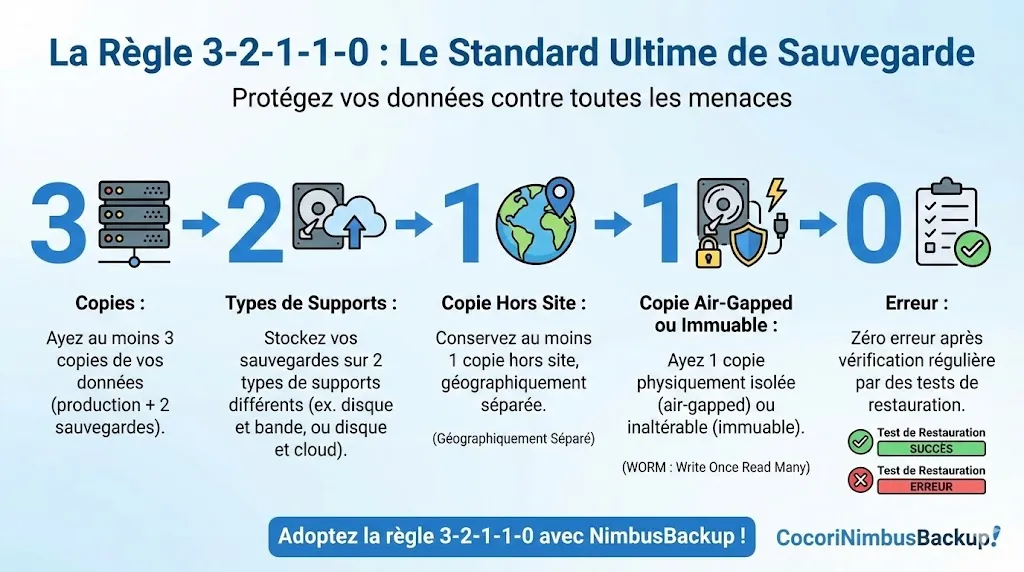
This is the critical step that transforms a simple local backup into a true data protection strategy. Offsite backup means sending your backups to a PBS hosted in a geographically remote datacenter, outside your infrastructure. In case of a major disaster (fire, flood, ransomware), your data remains accessible.
3.1 Add a remote PBS
PBS allows you to configure remotes (remote servers) and sync jobs to automatically replicate backups:
# On your local PBS: add the remote PBS as a remote
proxmox-backup-manager remote add nimbus-remote \
  --host pbs-remote.example.com \
  --port 8007 \
  --auth-id backup@pbs!sync-token \
  --password <TOKEN_SECRET>

# Create a sync job to replicate the datastore
proxmox-backup-manager sync-job create push-to-nimbus \
  --remote nimbus-remote \
  --remote-store remote-datastore \
  --store local-backups \
  --schedule "0 4 * * *" \
  --remove-vanished true
The sync job runs every night at 4 AM (after the 2 AM backup). Thanks to PBS deduplication, only modified blocks are transferred, significantly reducing bandwidth requirements.
3.2 Network and bandwidth considerations
Bandwidth estimation:
- Initial backup (full): For 1 TB of data, expect about 8 hours at 300 Mbps. This first transfer is the most voluminous.
- Daily incremental syncs: With PBS deduplication, the daily delta typically represents 1 to 5% of total volume, or 10 to 50 GB for 1 TB.
- Recommended connection: 100 Mbps symmetric minimum for comfortable operation. PBS supports bandwidth limiting (
rate-in) to avoid saturating your link.
This is where NimbusBackup comes in
Rather than managing a second PBS server in a remote datacenter yourself, you can use NimbusBackup as your offsite destination. We host your remote PBS in Equinix datacenters in the Paris region, on our own BGP network infrastructure (AS206014). To go further, check out our complete 3-2-1 strategy for Proxmox VMs and the complete server management guide.
- Pre-configured PBS ready to use
- Client-side AES-256 encryption: we never have access to your data in clear text
- No bandwidth charges, 10 Gbps backbone connection
- European hosting (French on request), GDPR compliant
Step 4: Verification and restore tests
A backup that has never been tested is not a backup. PBS includes automatic verification mechanisms that you should absolutely enable.
4.1 Integrity verification (verify jobs)
Verify jobs check the integrity of each stored chunk by recalculating SHA-256 checksums:
# Create a weekly verification job
proxmox-backup-manager verify-job create weekly-verify \
  --store local-backups \
  --schedule "0 6 * * 0" \
  --ignore-verified true \
  --outdated-after 30

# Run a manual verification
proxmox-backup-client verify --repository \
  backup@pbs!token@pbs-server:local-backups
The ignore-verified option avoids re-verifying chunks already recently checked, while outdated-after forces a re-verification after 30 days.
4.2 Restore test
Schedule a full restore test at least once per quarter. Here is the procedure:
- Choose a representative VM from your fleet (database, business application, etc.)
- Restore to a test node with a different VMID to avoid conflicts
- Verify the VM starts and services are functional
- Test data access: database integrity, application files
- Document the result: actual restore time (real RTO), issues found
- Delete the test VM once the test is validated
# Restore VM 100 from the latest backup, with new VMID 9100
qmrestore pbs:backup/vm/100/2026-02-19T02:00:05Z 9100 \
  --storage local-zfs \
  --unique true

# Check the restored VM status
qm status 9100
Document every restore test. During an audit (NIS2, ISO 27001), this evidence demonstrates the reliability of your backup strategy. The "0" in the 3-2-1-1-0 rule means precisely: zero errors after verification.
4.3 Monitoring and alerts
Configure notifications to be alerted in case of failure:
- PBS notifications: email or webhook on backup, sync, or verify failure
- PVE notifications: built-in alerts in the backup job (
mailnotification always) - External monitoring: integrate PBS into your monitoring tool (Zabbix, Prometheus) via the REST API
Best practices
Here are the essential recommendations for a robust Proxmox backup strategy:
Systematic AES-256-GCM encryption
Always enable client-side encryption when adding PBS storage in PVE. Data is encrypted before leaving your server, ensuring confidentiality even if the PBS server is compromised. Store the encryption key in a secrets manager (Vault, KeePass, Bitwarden) and regularly test that you can retrieve it.
Deduplication and garbage collection
PBS automatically runs garbage collection to free space from orphan chunks. Regularly check the deduplication ratio in the PBS interface (Datastore > Summary tab). A typical ratio is between 2:1 and 10:1 depending on the diversity of your VMs. The more your VMs share common OS bases, the better the ratio.
Account and privilege separation
Create a dedicated user or API token for each PVE node connecting to PBS. Use PBS ACLs to limit each token's access to only the necessary datastore. An attacker compromising one PVE node must not be able to delete backups from other nodes.
Retention adapted to your business needs
Adapt the retention policy to your legal obligations and operational needs. Some sectors (healthcare, finance) require multi-year retention. Don't hesitate to differentiate policies between critical VMs and development VMs.
3-2-1 rule minimum
Maintain at minimum 3 copies of your data (production + local PBS + remote PBS), on 2 different media types (production disks + PBS disks), with 1 offsite copy (offsite PBS). For optimal ransomware protection, aim for the 3-2-1-1-0 rule with an air-gapped or immutable copy.
Which NimbusBackup offering to choose?
NimbusBackup offers 6 PBS plans hosted in France, adapted to all protection levels. All include client-side encryption, native deduplication, and French technical support.
* All prices are excl. tax, per terabyte and per month. PBS deduplication significantly reduces the actual stored volume.
Conclusion
Setting up a robust Proxmox backup strategy is not complex, but requires method. By following the four steps in this guide, you achieve protection compliant with the 3-2-1 rule:
- Local PBS backup with deduplication and encryption
- Intra-cluster replication for high availability
- Offsite to a remote PBS (NimbusBackup or your own infrastructure)
- Verification and tests regularly to guarantee restorability
The time investment is modest: a few hours for initial configuration, then automated daily monitoring. The cost of data loss, however, can run into tens or even hundreds of thousands of euros, not to mention the impact on your company's reputation.
Don't wait for the next incident to act. Every day without offsite backup is a day when your data is at risk.
Sources and references
Protect your Proxmox VMs with NimbusBackup
Offsite, encrypted, and sovereign backup. From EUR 12/TB/month.